ITOnLife

A man who comes from HK work at a IT company, small potato staff

Showing posts with label Outlook. Show all posts

Saturday, March 27, 2021

Renaming an Outlook Profile


Make sure Outlook is fully shut down.

Start the Registry Editor (regedit) and go to

Computer\HKEY_CURRENT_USER\SOFTWARE\Microsoft\Office\<version>\Outlook\Profiles

Outlook 365 and Outlook 2016

Computer\HKEY_CURRENT_USER\SOFTWARE\Microsoft\Office\16.0\Outlook\Profiles

Outlook 2013

Computer\HKEY_CURRENT_USER\SOFTWARE\Microsoft\Office\15.0\Outlook\Profiles

Under that label all the profiles are listed.

Right-click on a label and choose Rename.  We’ve changed the profile from the useless default ‘Outlook’ to something clearer.

Wednesday, October 07, 2020

How To Allow Others To Edit Your Shared Calendar In Outlook?

如果分享Outlook行事曆給同事,並且讓對方可以編輯


1. Go to the Calendar view first.

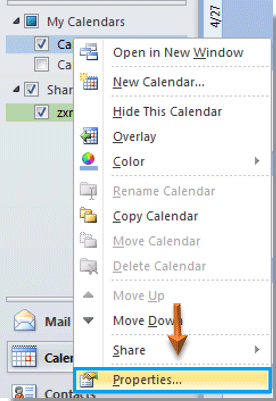
2. Right click on the Exchange calendar which you have already shared with others under My Calendars section, and then click Properties from the right-clicking menu. See screenshot:

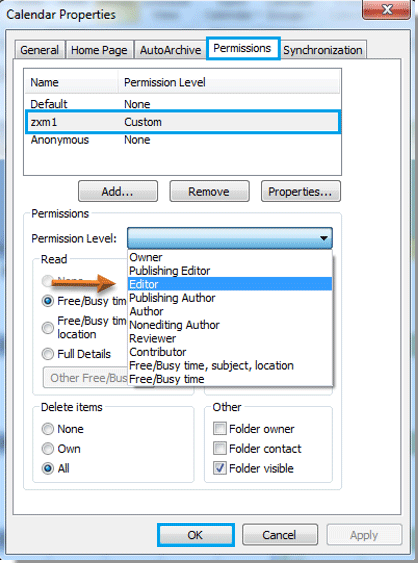
3. In the Calendar Properties dialog box, you need to:

A. Go to the Permissions tab;

B. Select the user name which you will allow to edit your shared calendar under Name section.

C. Then select Editor from the Permission Level drop down list.

D. And finally click OK button to exit the dialog box. See screenshot:

Now your shared calendar can be edited by others which you have given them the editing permission in step 3.

Note: Your shared calendar will be synchronized automatically after it was edited by others.